What You Will Learn
Why Fancy Templates Get Rejected in 7 Seconds
Here is a mistake almost every student makes when preparing their first CV. They open Canva or search Google for "modern CV template," pick a colorful two-column layout with dark sidebars, star ratings, and big circular percentage bars ("Teamwork: 95%, MS Office: 80%"), and feel super proud of how pretty it looks.
Then they apply to 40 jobs and hear nothing back. Why?
- Hiring software (ATS) cannot read graphics: Big companies, banks, and portals like LinkedIn or Rozee.pk use Applicant Tracking Systems (ATS) that scan text from left to right. Multi-column text boxes and icons often scramble your text into gibberish—so your CV gets filtered out automatically before a human ever sees it.
- Recruiters only spend 6 to 7 seconds scanning: When an HR manager opens 150 emails in one afternoon, colorful banners and meaningless "90% skill bars" make it harder to find your degree, your skills, and your projects.
A plain, sharp, black-and-white single-column CV looks calm, confident, and senior. It tells the recruiter: "I respect your time—here is exactly what I can do."
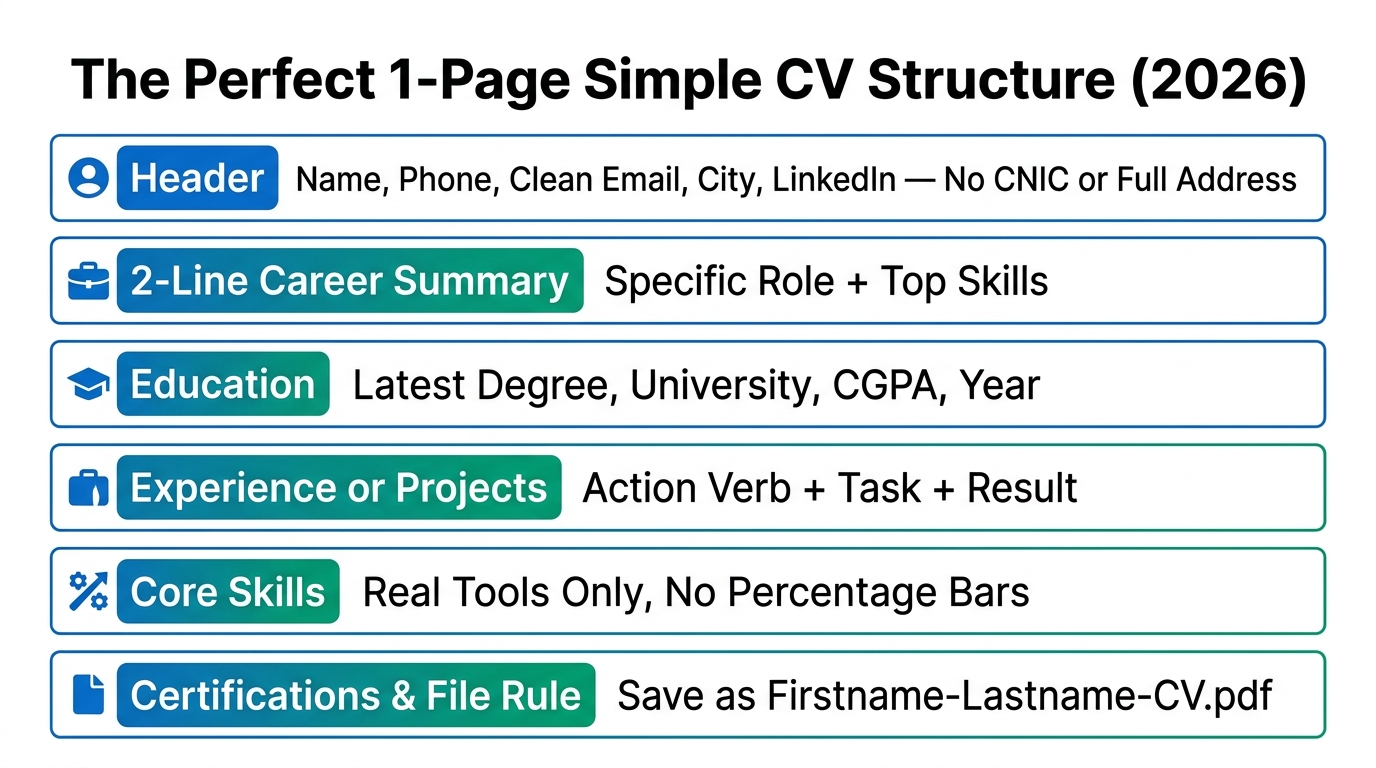
The 6 Exact Sections of a Winning 1-Page CV
Open Microsoft Word or Google Docs, set normal 0.7-inch margins, pick one clean font (Calibri, Arial, Inter, or Georgia at 10.5pt–11pt), and follow these six sections in exact order:
1. Clean Header (Top of Page)
Write your Full Name slightly larger and bold (18pt–20pt). Right underneath on one or two clean lines, put only: City (e.g., Lahore, Pakistan) • Phone Number • Professional Email • LinkedIn/GitHub Link. Nothing else!
2. Short 2-Line Summary (Skip the Cliché!)
Never write: "To work in a dynamic and challenging environment where I can utilize my abilities for the growth of the organization." Every recruiter has read that copy-paste line ten thousand times! Instead, write 2 short sentences stating who you are, your main skills, and what role you are targeting.
3. Education (Newest Degree First)
If you are a student or fresh graduate, put Education near the top. Write your University Degree, University Name, Graduation Year (or Expected Year), and your exact CGPA or percentage (you can verify your numbers quickly with our CGPA Calculator or Percentage to CGPA Converter). You can list Intermediate (FSc/FA/A-Levels) in one short line below it—skip primary/middle school completely!
4. Experience or Academic Projects
Have you done an internship, freelance work, or part-time tutoring? List it here! No formal job experience yet? Use your Final Year Project (FYP), semester projects, or volunteer work! Rename the section "Projects & Experience" and write 2–3 action-based bullet points per project explaining what you actually built or solved.
5. Core Skills (Plain List, No Percentages)
Group your real, testable skills neatly on 2–3 lines—for example: Technical Tools: Python, SQL, MS Excel (Pivot Tables, VLOOKUP), Power BI | Languages: English (Fluent), Urdu (Native). Do not write vague words like "Hardworking" or "Quick Learner" here.
6. Certifications & Achievements (Optional, 2–3 Lines Max)
Include verified certificates like DigiSkills, NAVTTC, Coursera, or university society leadership roles (for example, "Event Coordinator, University IEEE Society — managed 200+ student attendees").
Before vs. After: How Strong Bullet Points Sound
The difference between an ignored CV and an interview call is usually just how you write your sentences. Use this simple formula: Action Verb + What You Did + Result/Number.
| Weak (Gets Ignored) | Strong (Gets Interview Calls) |
|---|---|
| "Objective: Seeking a challenging career in a reputable firm." | "Final-year BS Finance student (CGPA 3.42) skilled in Excel modeling and financial reporting, seeking a summer finance internship." |
| "Worked on a website project in university." | "Built a responsive student attendance web app using HTML, Tailwind CSS, and Flask Python, reducing manual entry time by 50%." |
| "Did social media marketing internship." | "Managed Instagram and Facebook content calendar for 8 weeks, growing post engagement by 35% across 24 published reels and carousels." |
| "MS Office: 85% | Communication: 90%" | "MS Excel (VLOOKUP, Pivot Tables), MS Word, PowerPoint, Google Sheets, Business Email Drafting" |
Ready-to-Copy Simple CV Format
Copy the exact clean layout below into MS Word or Google Docs, replace the bracketed details with your own information, and keep it neatly on 1 page:
AHMAD RAZA KHAN
Lahore, Pakistan • +92-300-1234567 • ahmad.raza.pk@gmail.com • linkedin.com/in/ahmadraza
Profile Summary
BS Computer Science graduate (CGPA 3.45/4.0) with hands-on experience building Python web apps and SQL databases. Seeking a Junior Developer or ICT Internship role to contribute clean code and fast problem-solving.
Education
CGPA: 3.45 / 4.00 • Relevant Coursework: Data Structures, Database Systems, Web Engineering
Marks: 912 / 1100 (82.9% — First Division)
Projects & Experience
- Developed a web calculator in Python (Flask) and JavaScript enabling 500+ test users to check BPS age and degree eligibility in under 10 seconds.
- Designed clean SQLite queries and responsive Tailwind CSS layouts for mobile and desktop users.
- Updated product pages and fixed broken HTML/CSS links across 3 local e-commerce websites, improving mobile page layout.
Core Skills
Technical: Python, HTML5, CSS3, JavaScript, SQL, Git/GitHub • Productivity: MS Excel, MS Word, Google Workspace • Languages: English, Urdu
Certifications & Activities
- DigiSkills 3.0 Certified in Freelancing & WordPress (Virtual University of Pakistan, 2025)
- Member, University Tech Society — helped organize annual student coding competition (150+ participants)
7 Things Pakistani Students Should Delete From Their CV Today
- Your CNIC number, father's name, religion, and marital status: Never share your CNIC publicly on a CV sent to random company emails—it is a privacy risk! (Note: Only fill those fields if a specific government department gives you its official printed biodata form.)
- Your full house/street address: Just writing your city (e.g., "Rawalpindi, Pakistan") is plenty.
- "Curriculum Vitae" or "Resume" as the big title at the top: Your Name is the title! Recruiters already know it's a CV.
- Percentage bars or star ratings: Saying "Creativity: 4/5 stars" is meaningless and hurts ATS scanning.
- A childish email address: Change prince_ali_786@gmail.com to ali.hassan.pk@gmail.com.
- "References will be furnished upon request": Everyone knows you will provide references if asked—save that line of space for a real skill or project.
- A casual selfie or cropped wedding photo: For corporate and IT jobs, skip the photo unless specifically requested. If requested (for example, hospitality or certain traditional offices), use a clean passport-style headshot on a plain background.
Final Formatting & Sending Checklist
- Length: Strictly 1 page for 0–3 years experience (check print preview before exporting!).
- File Format & Name: Export as a text-selectable PDF and name it clearly:
Ahmad-Raza-CV.pdf(neverNew_CV_final2(1).pdf!). - Zero Typos: Read your CV out loud once, or ask one careful friend to check spelling and dates.
- Ready to Apply? Put your new CV to work right away with our Merit-Based Internship Guide and check your job options with our Free Eligibility Checker!