Use this free CGPA calculator to work out your cumulative grade point average and total quality points across all semesters. Just enter your semester GPA and credit hours, and you will get your final CGPA in seconds. It follows the same HEC formula that Pakistani universities use for FPSC and PPSC job applications.
What is CGPA?
CGPA stands for Cumulative Grade Point Average. It is a single number that represents your overall academic performance across all semesters of your degree program. Unlike semester GPA, which shows your performance in one semester, CGPA shows your performance throughout your entire university journey.
In Pakistan, most universities use a 4.00 scale for CGPA. When you graduate, your CGPA becomes the most important number on your transcript. It determines your class position, eligibility for scholarships, and even your chances of getting selected for government jobs through FPSC, PPSC, and other public service commissions.
For example, if you are applying for a job through the FPSC/PPSC Auditor Eligibility Checker, your CGPA is one of the first things they verify. If your CGPA does not meet the minimum requirement, your application will be rejected regardless of your other qualifications.
What are Quality Points in CGPA Calculation?
Quality Points are the foundation of CGPA calculation. A quality point is the product of your grade point in a course multiplied by the credit hours of that course. Every semester, your quality points add up to form your total quality points, which then determine your CGPA.
Think of quality points as the raw score that universities use to measure your academic performance. A course with 3 credit hours and a grade point of 4.00 gives you 12 quality points (3 x 4.00 = 12). A course with 1 credit hour and the same grade point gives you only 4 quality points (1 x 4.00 = 4).
This is why credit hours matter so much. If you score well in a high-credit course, your quality points increase significantly. If you score poorly, your quality points drop dramatically. Our CGPA calculator automatically calculates your total quality points along with your final CGPA.
How to Calculate CGPA in Pakistan (Step by Step)
Using our CGPA calculator is simple. Follow these steps:
- Step 1: Enter your GPA for Semester 1 in the first box. GPA is usually on a 4.00 scale.
- Step 2: Enter the total credit hours for that semester in the second box.
- Step 3: Repeat for all semesters. If you have more than 4 semesters, click the blue “Add More Semester Row” button.
- Step 4: Click the green “Compute Cumulative CGPA” button to see your result instantly.
That is it. The tool will show your total quality points, total credit hours, and final CGPA on a 4.00 scale — all within seconds.
CGPA Formula in Pakistan (HEC)
The official formula used by Pakistani universities and mentioned in HEC guidelines is:
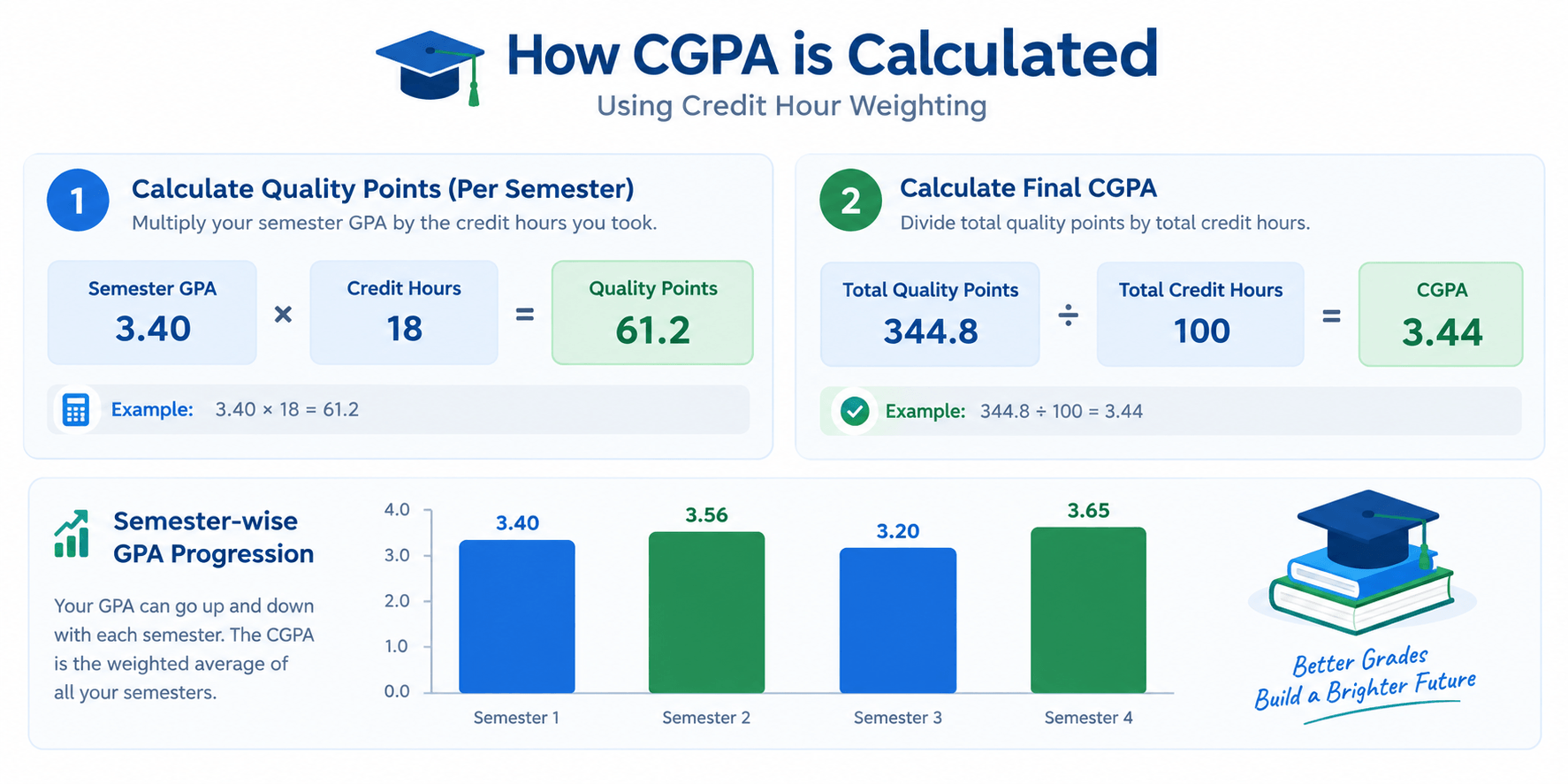
CGPA = Sum of (Credit Hours x Grade Point) / Sum of Credit Hours
Here is a practical example. Suppose you have:
- Semester 1: GPA 3.40, Credit Hours 18
- Semester 2: GPA 3.56, Credit Hours 17
- Semester 3: GPA 3.20, Credit Hours 18
- Semester 4: GPA 3.65, Credit Hours 16
Quality Points: (3.40 x 18) + (3.56 x 17) + (3.20 x 18) + (3.65 x 16) = 61.2 + 60.52 + 57.6 + 58.4 = 237.72
Total Credit Hours: 18 + 17 + 18 + 16 = 69
Final CGPA: 237.72 / 69 = 3.44
Our CGPA calculator does this calculation instantly, so you do not have to worry about manual math or calculation errors.
How to Calculate CGPA from Marks
Many students ask how to calculate CGPA from marks. Here is the process:
- Convert marks to grade points: Use your university grading scale. For example, 80-100% = 4.00, 70-79% = 3.00-3.99, and so on.
- Multiply grade point by credit hours: This gives you quality points for each course.
- Add all quality points: This is your total quality points.
- Divide by total credit hours: This gives you your CGPA.
For example, if you have marks of 85% in a 3-credit course, and your university uses the standard scale where 85% = 3.7 grade points, then your quality points for that course = 3.7 x 3 = 11.1.
How to Calculate CGPA from Percentage
If you have a percentage and want to convert it to CGPA, you can use the reverse of the HEC formula. However, HEC uses a band-based conversion, so the formula is not simply a direct multiplication.
For quick conversion, use our GPA to Percentage Calculator which uses the exact HEC formula. For official purposes, always get a percentage certificate from your university Controller of Examinations.
CGPA to Percentage Calculator (Out of 4 Scale)
If you need to convert your CGPA to percentage for a job application, HEC uses a band-based mapping. For a quick and accurate conversion, use our GPA to Percentage Calculator.
Percentage to CGPA Calculator Pakistan
Sometimes job forms ask for your percentage, and sometimes they ask for CGPA. If you have a percentage and need to find your CGPA, you can use our GPA to Percentage Calculator which works both ways. Just enter your percentage and it will show you the equivalent CGPA on the 4.00 scale.
How to Calculate CGPA from GPA
Your GPA is for one semester, but your CGPA is for your entire degree. To go from GPA to CGPA, you need to combine all your semester GPAs using credit hour weighting.
Here is how it works. Multiply each semester GPA by that semester total credit hours. Add all those numbers together. Then divide by your total credit hours across all semesters. That is your CGPA.
For example, if Semester 1 had a GPA of 3.4 with 18 credit hours, and Semester 2 had a GPA of 3.6 with 17 credit hours, then your quality points would be (3.4 x 18) + (3.6 x 17) = 61.2 + 61.2 = 122.4. Total credit hours = 35. CGPA = 122.4 / 35 = 3.50.
How CGPA is Calculated in Pakistan Universities
Every university in Pakistan follows the same basic method for calculating CGPA. The formula is always: CGPA = Sum of (Credit Hours x Grade Point) / Sum of Credit Hours.
What differs slightly is the grading scale. Some universities like NUST and LUMS have specific ranges for each letter grade. Others like Punjab University and UET use the standard HEC scale. Always check your own university official grading policy to make sure you are using the right grade points.
Why Credit Hours Matter in CGPA Calculation
Many students make a common mistake: they simply add up all semester GPAs and divide by the number of semesters. This is wrong. The correct method uses credit hours weighting.
Here is why credit hours matter:
- Quality Points: Your semester GPA is multiplied by the credit hours of that semester to get quality points.
- Weighted Average: Your final CGPA is the total quality points divided by total credit hours across all semesters.
This means a semester with 18 credit hours has more impact on your CGPA than a semester with 12 credit hours. Our CGPA calculator handles this automatically.
Understanding CGPA vs GPA
Let me clarify the difference between GPA and CGPA:
- GPA (Grade Point Average): Your performance in one semester. It resets every semester.
- CGPA (Cumulative Grade Point Average): Your overall performance across all semesters. It never resets.
So when you apply for a job or scholarship, they usually ask for your CGPA, not your GPA. Our CGPA calculator gives you the number that matters most.
CGPA Requirements in Pakistani Universities
Different universities have different CGPA requirements for graduation. Here is a general breakdown:
| Program Level | Minimum CGPA | Good Standing |
|---|---|---|
| Undergraduate (BS, BA, BSc) | 2.00 | 3.00+ |
| Postgraduate (MS, MPhil) | 2.50 | 3.30+ |
| MBA / Professional Degrees | 2.50 | 3.50+ |
| PhD Programs | 3.00 | 3.70+ |
If your CGPA falls below the minimum, you may be placed on probation or even expelled. That is why tracking your CGPA is so important.
Grading Scale Used by Pakistani Universities
Most Pakistani universities use the following grading scale for the 4.00 CGPA system:
| Letter Grade | Grade Points | Marks Range |
|---|---|---|
| A+ | 4.00 | 90-100% |
| A | 4.00 | 85-89% |
| A- | 3.67 | 80-84% |
| B+ | 3.33 | 75-79% |
| B | 3.00 | 70-74% |
| B- | 2.67 | 65-69% |
| C+ | 2.33 | 60-64% |
| C | 2.00 | 55-59% |
| C- | 1.67 | 50-54% |
| D | 1.00 | 40-49% |
| F | 0.00 | Below 40% |
Note: Some universities like NUST and LUMS may have slightly different ranges. Always check your university official grading policy.
Common Mistakes Students Make When Calculating CGPA
Here are mistakes that students often make when calculating CGPA:
- Simple Averaging: Adding all GPAs and dividing by number of semesters. This is wrong because it ignores credit hours.
- Ignoring Failed Courses: If you fail a course, its credit hours still count toward your CGPA. Many students forget this.
- Repeating Courses: When you repeat a course, the new grade replaces the old one in CGPA calculation. But if your university uses a different policy, check with your registrar.
- Using Wrong Scale: Some universities use a 5.00 scale, but most Pakistani universities use 4.00. Make sure you are using the right scale.
- Forgetting Credit Hours: Not all courses have the same credit hours. A 3-credit course has more impact than a 1-credit course.
Why CGPA Matters for Government Jobs in Pakistan
In Pakistan, government job applications often require you to mention your CGPA. Portals like FPSC and PPSC use this information to verify your academic record. If your CGPA does not meet the minimum requirement for a post, your application may be rejected.
Also, some job portals do not accept CGPA directly. They need you to convert your CGPA to a percentage. You can use our GPA to Percentage Calculator for that.
Before applying for any government job, always check the eligibility criteria using our FPSC/PPSC Auditor Eligibility Checker.
CGPA Requirements for FPSC and PPSC Jobs
Most FPSC and PPSC jobs require a minimum of 2nd division, which translates to:
- 2nd Division: CGPA 2.00 to 2.99 (or 45% to 59%)
- 1st Division: CGPA 3.00+ (or 60%+)
Some competitive posts require 1st division, so a CGPA below 3.00 may disqualify you. Always check the specific job advertisement for exact requirements.
How to Improve Your CGPA (Practical Tips)
If your CGPA is lower than you would like, here are some practical tips to improve it:
- Focus on High-Credit Courses: Courses with more credit hours have a bigger impact on your CGPA. Prioritize them.
- Repeat Low-Grade Courses: If your university allows course repetition, retake courses where you got a low grade.
- Balance Your Semesters: Do not overload yourself with too many courses in one semester. Your GPA will suffer.
- Attend All Classes: Professors often give hints about exams in class. Attending regularly can improve your grades.
- Use Our CGPA Calculator: Track your CGPA after every semester so you know where you stand.
University-Specific CGPA Information
Different Pakistani universities have different CGPA policies. Here are some common ones:
- NUST: Uses 4.00 scale with specific grading ranges
- LUMS: Uses 4.00 scale with A+ starting at 90%
- UET: Uses 4.00 scale with traditional grading
- Punjab University: Uses 4.00 scale for semester system
- Virtual University: Uses 4.00 scale with online grading
Always check your specific university official policy for exact rules.
Frequently Asked Questions
How is CGPA calculated in Pakistan?
CGPA in Pakistan is calculated using the credit hour weighting method. The formula is: CGPA = Sum of (Credit Hours x Grade Point) / Sum of Credit Hours. This is the HEC method used by all Pakistani universities.
What is the CGPA formula in Pakistan?
The official CGPA formula in Pakistan is: CGPA = Sum of (Credit Hours x Grade Point) / Sum of Credit Hours. For example, if you have a 3-credit course with a grade point of 4.00, it gives 12 quality points. Total quality points divided by total credit hours gives your CGPA.
How to calculate CGPA from GPA in Pakistan?
To calculate CGPA from GPA, multiply each semester GPA by that semester total credit hours to get quality points. Add all quality points together, then divide by total credit hours across all semesters. This gives you your cumulative CGPA.
How to calculate CGPA from marks in Pakistan?
First convert your marks to grade points using your university grading scale. Then multiply each grade point by the credit hours of that course. Add all these quality points together and divide by total credit hours. This gives you your CGPA.
How to calculate CGPA from percentage in Pakistan?
HEC uses a band-based mapping to convert percentage to CGPA. For quick conversion, use our GPA to Percentage Calculator. For official purposes, get a percentage certificate from your university Controller of Examinations.
How to calculate CGPA in Pakistan university?
Every Pakistani university follows the same basic formula: CGPA = Sum of (Credit Hours x Grade Point) / Sum of Credit Hours. However, grading scales may vary slightly. Always check your university official grading policy for exact ranges.
What is the difference between Semester GPA and Cumulative CGPA?
A Semester GPA tracks your performance in one semester. A Cumulative CGPA compiles your overall performance across all semesters of your degree program. GPA resets every semester, but CGPA never resets.
Do failed courses count when calculating CGPA?
Yes. If you receive an F grade, the credit hours still count toward your total credit hours, which lowers your CGPA. You need to repeat the course to improve your grade and CGPA.
What is a good CGPA in Pakistan?
A CGPA above 3.00 is considered good in most Pakistani universities. A CGPA above 3.50 is excellent. For competitive job positions through FPSC and PPSC, aim for at least 3.00.
Can I calculate CGPA for an old annual system degree?
No. If your degree is from the annual system like BA or BSc with marks percentage, you do not need CGPA. Government portals have a separate field for annual marks. You can enter your percentage directly.
Is this CGPA calculator accurate?
Yes. Our CGPA calculator uses the official formula used by Pakistani universities: Sum of (Credit Hours x Grade Point) / Sum of Credit Hours. It calculates your CGPA exactly as your university does.
What are Quality Points and how are they calculated?
Quality Points are the product of your grade point and the credit hours of a course. For example, a 3-credit course with a grade point of 3.67 gives 11.01 quality points. Total quality points divided by total credit hours equals your CGPA.
Can I use this tool for a 5.00 CGPA scale?
Our CGPA calculator is designed for the 4.00 scale, which is the standard in most Pakistani universities. If your university uses a 5.00 scale, you will need to convert your GPA first.
What is the minimum CGPA required for government jobs in Pakistan?
Most FPSC and PPSC jobs require a minimum of 2nd division, which means CGPA 2.00 to 2.99. However, competitive posts often require 1st division, which means CGPA 3.00 or above. Always check the specific job advertisement.
Related Tools
If you found this CGPA calculator helpful, check out our other free career tools:
Job Categories
Looking for job opportunities? Browse our main sections:
- Federal Government Jobs
- Provincial Government Jobs
- Defense & Security Jobs
- Private Sector Jobs
- Job Alerts
Official University Resources
For official CGPA rules and verification, visit these resources:
