Use this free CNIC tracker for CNIC verification Pakistan — verify your 13-digit CNIC number, find out which province you belong to, and check if your CNIC format is correct for government job applications. For CNIC name check online, use the NADRA 8300 SMS service below. No signup, no data storage, 100% private.
⚡ Quick Answers
How do I check my CNIC name online?
For CNIC name check online, send your 13-digit CNIC number to 8300 via SMS from any Pakistani mobile network. You will receive the registered owner’s name and father’s name. Alternatively, use our free CNIC tracker above to check format and province.
What is CNIC name check?
CNIC name check is the process of verifying the registered name associated with a Pakistani national identity card number. It helps confirm identity and prevent fraud.
Can I check CNIC details by number?
Yes. Enter the 13-digit CNIC number in our tool to check format, province, and gender. For CNIC name check by number, use the official NADRA 8300 SMS service.
Is CNIC name check free?
Our CNIC tracker tool is completely free. NADRA’s SMS service (8300) charges a small fee per query.
🔍 CNIC Name Check by Number — How to Verify Name Online (2026)
Our CNIC tracker checks format, province, and gender — but it does not show the registered name, because that information is stored securely in NADRA’s database. For CNIC name check online and CNIC name check by number, use the official method below.
- Open your mobile SMS app on any Pakistani network (Jazz, Zong, Telenor, Ufone).
- Type your 13-digit CNIC number (without dashes). For example:
3520212345671 - Send it to 8300.
- Wait for the reply. You will receive the registered name and father’s name within seconds.
Note: The 8300 SMS service charges a small fee per query (usually a few rupees). Our free CNIC tracker checks format and province without any charge — use both together for complete verification.
What is a CNIC Tracker?
A CNIC tracker is a simple online tool that helps you verify your Computerised National Identity Card (CNIC) number. It checks the format, identifies your province, and tells you whether your CNIC is written correctly for government job applications.
Every CNIC in Pakistan follows a specific 13-digit structure that contains hidden information about your identity. Most people don’t know this, but your CNIC number actually reveals your province, district, family number, and even your gender. Our CNIC checker decodes all of this information instantly.
If you’re applying for a government job in Pakistan, you’ve probably seen “CNIC format error” on application portals like FPSC, PPSC, or NTS. This usually happens when the CNIC is written with extra spaces, missing dashes, or incorrect digits. Our CNIC validator solves this problem instantly.
How to Use This CNIC Tracker
Using our CNIC checker is very simple. Just follow these steps:
- Step 1: Type your 13-digit CNIC number in the box above. You can write it with or without dashes (e.g., 3520212345671 or 35202-1234567-1).
- Step 2: Click the “Track My CNIC” button.
- Step 3: The tool will instantly show your province, gender, and verify whether your CNIC format is correct.
That’s it. No signup, no downloads, no waiting. Your data never leaves your device — everything runs in your browser.
Understanding Your CNIC Structure (13 Digits Breakdown)
Every CNIC number in Pakistan contains hidden information. Let me break it down for you:
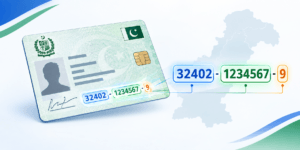
- First Digit (Province): Shows your province of registration. 1 for Khyber Pakhtunkhwa, 2 for FATA, 3 for Punjab, 4 for Sindh, 5 for Balochistan, 6 for Islamabad (ICT), and 7 for Gilgit-Baltistan.
- First Five Digits (District & Tehsil): The first five digits together identify your district, tehsil, and union council. For example, 35202 is a specific district code in Lahore.
- Middle Seven Digits (Family Number): This is your family number. All members of your family share the same middle code, which forms your family tree. This helps NADRA link family members together.
- Last Digit (Gender): Shows your gender. Odd numbers (1, 3, 5, 7, 9) are for males, and even numbers (2, 4, 6, 8) are for females.
CNIC Province Codes 2026 (Complete List)
Here is the complete list of CNIC province codes in Pakistan:
| First Digit | Province / Region | Example Districts |
|---|---|---|
| 1 | Khyber Pakhtunkhwa (KPK) | Peshawar, Mardan, Abbottabad |
| 2 | FATA (Former Tribal Areas) | Khyber, Kurram, Waziristan |
| 3 | Punjab | Lahore, Multan, Rawalpindi |
| 4 | Sindh | Karachi, Hyderabad, Sukkur |
| 5 | Balochistan | Quetta, Gwadar, Turbat |
| 6 | Islamabad (ICT) | Islamabad Capital Territory |
| 7 | Gilgit-Baltistan | Gilgit, Skardu, Hunza |
Note: Some CNIC numbers start with other digits (8, 9, 0), which are usually for overseas Pakistanis or special categories.
Why CNIC Format Matters for Job Applications
Government job portals in Pakistan, including FPSC, PPSC, NTS, OTS, and PTS, have strict CNIC format requirements. If your CNIC is not written correctly, your application will be rejected automatically — even if you’re otherwise fully qualified.
Here are the most common CNIC format errors that cause rejection:
- Extra spaces: Writing “35202 1234567 1” instead of “35202-1234567-1”
- Missing dashes: Writing “3520212345671” without dashes (some portals reject this)
- Incorrect number of digits: Writing 12 or 14 digits instead of 13
- Letters instead of numbers: Typing “O” instead of “0” or “I” instead of “1”
- Wrong hyphen placement: Writing “3520-21234567-1” instead of “35202-1234567-1”
- Leading zeros removed: Some systems remove leading zeros, which is a problem if your district code starts with 0
Our CNIC format checker helps you avoid all of these problems instantly.
How to Check CNIC Format Manually (Without a Tool)
If you want to check your CNIC format manually, here’s how:
- Count the digits: Your CNIC should have exactly 13 digits.
- Check the structure: It should be in the format XXXXX-XXXXXXX-X (5 digits, then 7 digits, then 1 digit).
- Verify each digit is a number: No letters allowed.
- Check dashes: Dashes should be at positions 5 and 12.
But manual checking is slow and error-prone. Our CNIC tracker does it in 1 second, with 100% accuracy.
NADRA CNIC Verification vs Our Tracker
Our CNIC validator is a format checker and province identifier. It is not an official NADRA CNIC verification tool. For official CNIC verification, you should use the official NADRA website or the Pak ID app.
NADRA has launched a new feature called CNIC Verification History that lets citizens check when and where their CNIC was used for verification. This is a great way to protect your identity from misuse. If you see any unauthorized verification, you can report it to NADRA immediately.
CNIC Verification Pakistan 2026 (Official Method)
For official CNIC verification Pakistan, you have three options:
- NADRA 8300 SMS: Send your CNIC number to 8300 for name verification.
- NADRA Website: Visit nadra.gov.pk for official services.
- Pak ID App: Use the official NADRA mobile app for digital verification.
Our free CNIC tracker is a quick pre-check tool — it verifies format, province, and gender instantly. For complete nadra cnic verification, use the official channels above.
Why Your CNIC Date of Birth Matters
For government job applications, the date of birth on your CNIC is the only date that matters. FPSC, PPSC, and other commissions use this date for age verification. If your CNIC has a wrong date of birth, your application will be rejected at verification — even if you’re otherwise eligible.
If your CNIC has a wrong date of birth, get it corrected immediately. You can visit your nearest NADRA registration center with your Matriculation certificate (which shows your real date of birth) and apply for correction. The process takes 2-4 weeks.
Common CNIC Mistakes That Cause Job Rejection
Here are real mistakes that candidates make — and how to avoid them:
- Using old CNIC: If your CNIC has expired or has incorrect information, get it renewed before applying.
- Wrong CNIC in form: Typing your CNIC incorrectly on the application form. Use our tool to get the correct format, then copy-paste.
- CNIC not linked to SIM: Some job portals verify your CNIC against your SIM database. Make sure your CNIC is linked to your active SIM.
- Name mismatch: The name on your CNIC should match your Matriculation certificate. If there’s a difference, get it corrected.
- Expired CNIC: Some portals require a valid, non-expired CNIC. Check the expiry date on your CNIC before applying.
CNIC Requirements for FPSC Jobs 2026
For FPSC jobs 2026, you need to provide:
- A valid, non-expired CNIC
- The CNIC number in correct format (XXXXX-XXXXXXX-X)
- A scanned copy of your CNIC (front and back) for upload
- The scanned copy should be clear and readable
- File size should be under 200KB (use our Document Resizer tool)
If any of these requirements are not met, your application will be rejected during the verification stage.
CNIC Requirements for PPSC Jobs 2026
For PPSC jobs 2026, the CNIC requirements are similar:
- Original CNIC must be brought to the exam hall
- CNIC number must be written correctly on the application form
- The name and date of birth on the CNIC must match your Matriculation certificate
- If you have a smart card CNIC, make sure it’s readable at all times
Who Can Use This CNIC Tracker?
Our CNIC tracker is useful for:
- Job Seekers: Verify your CNIC before applying for government jobs through FPSC, PPSC, NTS, or other portals.
- Students: Check your CNIC for exam registration and scholarship applications.
- Anyone: If you want to know which province your CNIC is registered in.
- Overseas Pakistanis: Verify your CNIC/NICOP format before applying for jobs back home.
Is This CNIC Tracker Safe?
Yes, 100% safe. Our CNIC tracker runs entirely in your browser. Your CNIC number is never sent to any server, never stored, and never shared. Everything happens on your device.
This is different from many other CNIC checkers that send your data to their servers. We believe in complete privacy. Your identity documents are your business — not ours.
CNIC Format Rules for Different Portals
Different job portals have slightly different requirements:
| Portal | CNIC Format | Extra Requirements |
|---|---|---|
| FPSC | XXXXX-XXXXXXX-X | Scanned copy under 200KB |
| PPSC | XXXXX-XXXXXXX-X | Original CNIC at exam |
| NTS | XXXXX-XXXXXXX-X | CNIC required for test day |
| OTS | XXXXX-XXXXXXX-X | CNIC for challan form |
| PTS | XXXXX-XXXXXXX-X | CNIC for registration |
Frequently Asked Questions (FAQ)
Q1: What is a CNIC tracker and how does it work?
A CNIC tracker is a free online tool that verifies your 13-digit CNIC number. It checks the format, identifies your province from the first digit, and tells you whether your CNIC is correct for job applications. It runs entirely in your browser — no data is sent to any server.
Q2: Can this tool tell me my complete CNIC details like name, address, or photo?
No. Our CNIC checker only checks the format and identifies your province from the first digit. It does not access any NADRA database and cannot show personal details. For complete CNIC information, use the official NADRA website.
Q3: How to check CNIC name online?
For CNIC name check online, send your 13-digit CNIC number to 8300 via SMS from any Pakistani mobile network. You will receive the registered owner’s name and father’s name. The service is provided by NADRA and charges a small fee per query.
Q4: What is the SMS code for CNIC name verification?
The NADRA SMS verification code is 8300. Send your CNIC number to 8300 and receive the registered name and father’s name within seconds. The service costs a small fee.
Q5: Can I check CNIC name by number?
Yes. Use the NADRA 8300 SMS service to verify the registered name for any CNIC number. Our free CNIC tracker checks format, province, and gender but not the registered name.
Q6: Is CNIC name check free in Pakistan?
Our CNIC tracker tool is 100% free. NADRA’s official 8300 SMS service charges a small fee per verification query (usually a few rupees per SMS).
Q7: What is CNIC name check?
CNIC name check is the process of verifying the registered name associated with a Pakistani national identity card number. It helps confirm identity and prevent fraud.
Q8: Why does the job portal say “CNIC format error”?
This error usually happens when your CNIC contains extra spaces, missing dashes, or incorrect digits. Use our tool to get the correct format, then copy-paste it into the job application form. If the error persists, try clearing your browser cache or using a different browser.
Q9: Can I use this tool if my CNIC starts with 2 (FATA)?
Yes. Our CNIC tracker supports all valid CNIC prefixes, including 1 (KPK), 2 (FATA), 3 (Punjab), 4 (Sindh), 5 (Balochistan), 6 (Islamabad), and 7 (Gilgit-Baltistan).
Q10: Is my CNIC number saved anywhere?
No. We do not save, store, or share your CNIC number. Everything runs locally in your browser. Once you close the page, the data is gone.
Q11: Can I use this tool on my mobile phone?
Yes. Our CNIC tracker works on all devices — mobile, tablet, and desktop. No app download needed.
Q12: What if my CNIC format is correct but the portal still gives an error?
If your CNIC format is correct but the portal still shows an error, the issue may be with the portal itself. Try using a different browser, clearing your cache, or contacting the portal’s support team.
Q13: How can I find my district from my CNIC number?
Your CNIC’s first five digits identify your district, tehsil, and union council. For example, 35202 is a specific district code in Lahore. You can search “NADRA district codes” to find the full list.
Q14: What does the last digit of my CNIC mean?
The last digit of your CNIC shows your gender. Odd numbers (1, 3, 5, 7, 9) are for males, and even numbers (2, 4, 6, 8) are for females.
Q15: Can I check if my CNIC is being misused?
NADRA has launched a CNIC Verification History feature that lets you check when and where your CNIC was used for verification. Visit the official NADRA website to access this feature.
Q16: What is the difference between CNIC and NICOP?
CNIC is for Pakistani citizens living in Pakistan. NICOP (National Identity Card for Overseas Pakistanis) is for Pakistani citizens living abroad. Both follow similar formats but have different prefixes.
Q17: How long does it take to get a CNIC corrected?
CNIC correction usually takes 2-4 weeks. You need to visit your nearest NADRA registration center with supporting documents (Matriculation certificate, old CNIC, etc.).
Q18: Can I use this CNIC tracker for private jobs?
Yes, you can use this CNIC tracker for any job that requires a CNIC number. Private companies also verify CNIC format before hiring.
Q19: Is this CNIC tracker free?
Yes, 100% free. No signup, no subscription, no hidden charges. Just enter your CNIC and click Track.
Q20: What should I do if my CNIC has a wrong date of birth?
Visit your nearest NADRA registration center with your Matriculation certificate (which shows your real date of birth) and apply for correction. The process takes 2-4 weeks. Don’t apply for jobs until your CNIC is corrected.
Related Tools
If you found this CNIC tracker helpful, check out our other free career tools:
- GPA to Percentage Calculator — Convert CGPA to marks for job applications
- CGPA Calculator — Calculate cumulative GPA with credit hours
- Typing Speed Test — Check your WPM for clerk jobs
- ATS Bio Data Maker — Create an ATS-friendly resume
- Document Resizer — Resize photos and signatures under 50KB
- FPSC PPSC Age Calculator — Check your age eligibility for government jobs
- All Free Tools — Explore our complete suite
Job Categories
Looking for job opportunities? Browse our main sections:
- Federal Government Jobs
- Provincial Government Jobs
- Defense & Security Jobs
- Private Sector Jobs
- Job Alerts
Official NADRA Resources
For official CNIC information and verification, visit these resources:
