Use our free typing test to check your typing speed (WPM) and accuracy before sitting for government clerical exams like LDC, UDC, and Data Entry Operator. The test tracks your performance in real time.
What is a Typing Test?
A typing test measures how fast and accurately you can type. It calculates your speed in Words Per Minute (WPM) and your accuracy percentage. For government job exams in Pakistan, a typing test is mandatory for clerical positions like LDC, UDC, and Data Entry Operator.
Our online typing test is designed specifically for Pakistani government job requirements. It uses the same WPM calculation method as official testing centers, so you know exactly where you stand.
How to Use This Typing Test
Using our typing test is simple. Follow these steps:
- Step 1: Select your difficulty level (Easy, Medium, or Hard).
- Step 2: Click inside the input box and start typing the text shown in the prompt.
- Step 3: The timer starts automatically when you begin typing.
- Step 4: Click “Finish Test” when done to see your WPM, accuracy, and grade.
The tool highlights correct characters in green and wrong characters in red, so you can see your mistakes in real time.
Online Typing Test – WPM Speed & Accuracy Checker
What is a Good Typing Speed (WPM)?
For government jobs in Pakistan, the minimum typing speed requirement varies by position:
- Junior Clerk (LDC): 30 WPM minimum with 80% accuracy
- Senior Clerk (UDC): 40 WPM minimum with 85% accuracy
- Data Entry Operator: 40-50 WPM with 90% accuracy
- Stenotypist: 50+ WPM with 90% accuracy
Aim for at least 40 WPM with 95% accuracy to be safe for most government positions. Our typing test gives you an accurate reading of your current speed.
How WPM is Calculated
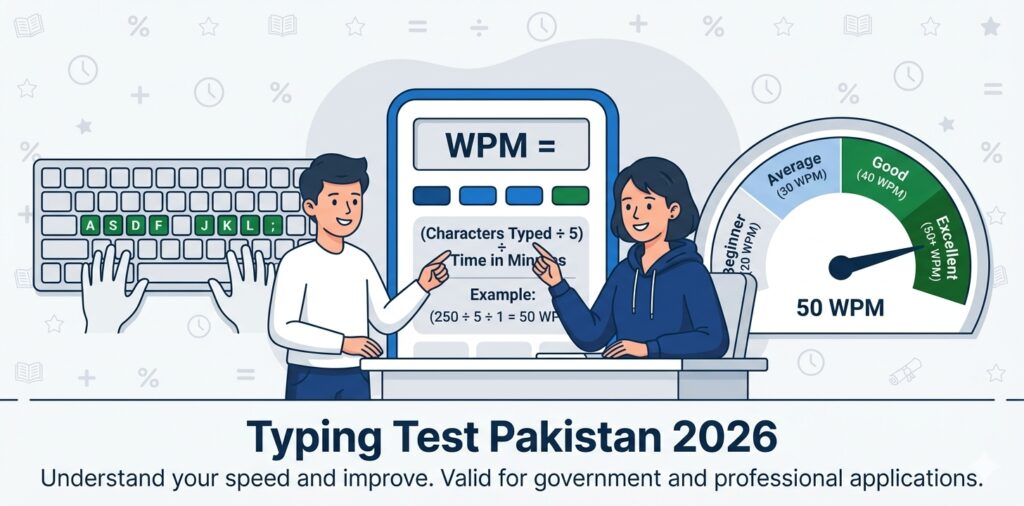
The standard WPM formula used by testing agencies is:
WPM = (Total Characters Typed ÷ 5) ÷ Time in Minutes
For example, if you type 250 characters in 1 minute, your WPM is 250 ÷ 5 = 50 WPM. Our typing test uses this exact formula.
Why Typing Speed Matters for Government Jobs
In Pakistan, government clerical jobs require fast and accurate typing. Here’s why:
- Exam Requirement: Most clerical positions require a typing test as part of the selection process.
- Daily Work: Clerks type documents, letters, and reports every day.
- Data Entry: Data Entry Operators must input large amounts of data quickly.
- Deadlines: Government offices have strict deadlines for paperwork.
Tips to Improve Your Typing Speed
If your typing test score is below the required WPM, here are some tips:
- Learn Touch Typing: Stop looking at the keyboard. Use the home row keys (ASDF – JKL;).
- Practice Daily: Spend 15-30 minutes daily on our typing test.
- Focus on Accuracy First: Speed comes with accuracy. Don’t rush.
- Use the Right Posture: Sit straight, keep wrists relaxed, and use all fingers.
- Take Breaks: Don’t practice for hours. Short, regular sessions work better.
- Track Progress: Use our typing test weekly to monitor improvement.
Common Typing Test Mistakes
- Looking at Keyboard: This slows you down. Learn touch typing.
- Rushing: Typing fast with many mistakes lowers your net WPM.
- Wrong Finger Placement: Use all 10 fingers, not just 2-3.
- Ignoring Punctuation: Government exams test punctuation accuracy.
- No Practice: Typing is a muscle memory skill. Regular practice is essential.
Frequently Asked Questions
Q1: What is the minimum typing speed for government jobs in Pakistan?
For Junior Clerk (LDC), the minimum is 30 WPM. For Senior Clerk (UDC) and Data Entry Operator, it’s 40 WPM. Aim for at least 40 WPM with 95% accuracy to be safe.
Q2: How is WPM calculated in government typing tests?
WPM = (Total Characters Typed ÷ 5) ÷ Time in Minutes. Our typing test uses this exact formula.
Q3: Can I use my own keyboard in the typing test?
No. Government testing centers provide standard desktop keyboards. Practice on a desktop keyboard, not a laptop, to prepare properly.
Q4: What is the allowed mistake percentage in typing tests?
Most government typing tests allow up to 5% mistakes. If your mistakes exceed this, your test is marked as failed regardless of speed.
Q5: How can I improve my typing speed from 25 WPM to 40 WPM?
Learn touch typing, practice daily for 15-30 minutes, focus on accuracy first, and use our typing test to track progress. Most people can reach 40 WPM in 4-6 weeks with regular practice.
Q6: Is this typing test accurate?
Yes. Our typing test uses the same WPM calculation method as official government testing centers. It gives you an accurate reading of your current typing speed.
Related Tools
If you found this typing test helpful, check out our other free career tools:
- Document Resizer — Compress photos under 50KB
- CNIC Tracker — Verify your CNIC format
- ATS Bio Data Maker — Create an ATS-friendly resume
- GPA to Percentage Calculator — Convert CGPA to marks
- CGPA Calculator — Calculate cumulative GPA
- All Free Tools — Explore our complete suite
Job Categories
Looking for job opportunities? Browse our main sections:
- Federal Government Jobs
- Provincial Government Jobs
- Defense & Security Jobs
- Private Sector Jobs
- Job Alerts
Official Testing Resources
For official typing test requirements, visit:
